

INFORMA's data, within your AI
Connect INFORMA's business information to the AI assistant you already use and ask about any company in natural language. Available on AI assistants such as Claude and ChatGPT.
Find the company. Get the information. Let your AI handle the rest.
Access INFORMA's complete business information from your AI. Choose the level that matches the decisions you need to make,backed by the trust and reliability of INFORMA CONFIA.

MCP Identifica
Who is this company?
Find any Spanish company and verify its identity before delving deeper into its details and viewing its company card.
What does it include?
- Search by company name, Tax ID, brand, website, or phone number
- Company card: company name, registered address, contact details, business activity, size, legal form, number of employees and basic corporate structure
// Example Company · 18 employees · Small Enterprise

MCP Essential
Who is in control?
Discover who owns and manages the company, and access its registered legal information, including BORME, press, and branches.
Includes everything in the Identify level, plus::
- Corporate structure: Shareholders, shareholdings, administrators
- Legal structure: BORME, press, branches
- Latest changes recorded
// Example Company · Sole shareholder (100 %) · 5 directors · 2 subsidiaries

MCP Advanced
How does it operate?
Assess its business risk and gain a deeper insight of a company's commercial and financial ecosystem, including its business relationships, operations, contracts, and sources of revenue.
Includes everything in the Essential level, plus:
- Business Risk: failure score, delinquency score, credit appraisal, Paydex, legal actions and insolvency proceedings
- Business information: customers, suppliers, bank entities, financing activities, public contracts, subventions, trade names...
- Analysis of the main balance sheet and profit and loss account items
// Example Company · INFORMA Score 16/20 · Low risk · Paydex 51

MCP Complete
What is the company's financial situation?
Individual financial information: detailed annual accounts, balance sheet and profit and loss account, cash flow statement, and ratios.
Includes everything in the Advanced level, plus:
- Información financiera individual: cuentas anuales al detalle, balance y cuenta de resultados, flujos de efectivo y ratios.
- Key items from the consolidated financial statements.
- Sectoral analysis: sector composition and comparison of key sector ratios against the company's ratios.
// Example Company · Revenue €12.4M · EBITDA €1.8M · ROE 9.1 %
Not sure which level you need?
Our team will help you choose the right oneConnect it to your assistant
MCP-Empresas INFORMA is a standard MCP connector. Choose your AI assistant, follow the setup steps, and sign in with your INFORMA account.
Not an INFORMA customer yet? Contact us →
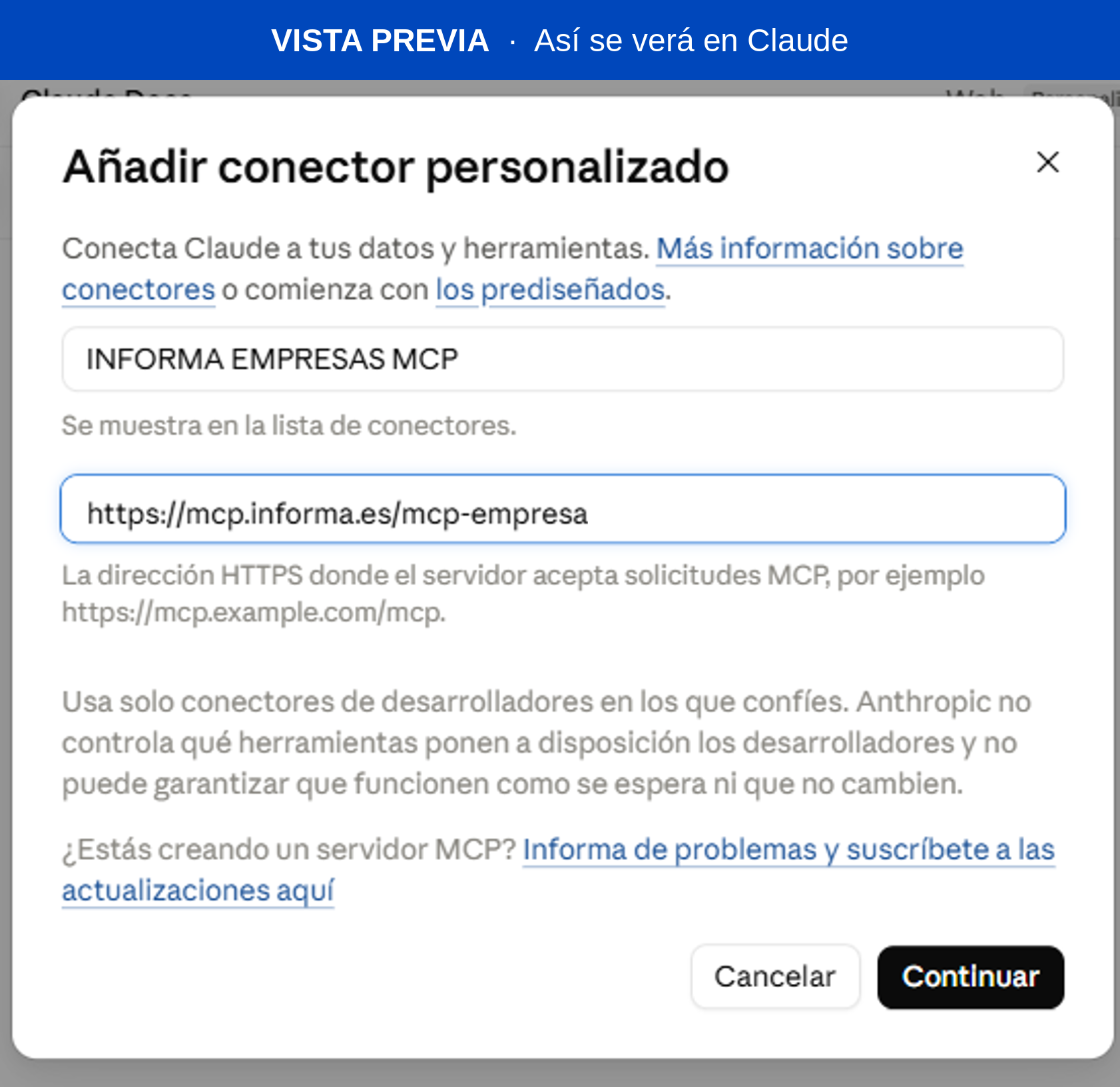
INFORMA's mcp-empresa connector is now available on Claude Web and Claude Desktop:
-
Disable model improvement
In Claude, select your name (bottom left), go to > Settings, click Privacy and turn off Help improve our AI models.
-
Add the connector
Go to Settings > Connectors, and selectAAdd > Add custom connector , en enter INFORMA EMPRESAS MCPin the Name field, paste the URL below and tap Continue.
-
Configure the OAuth client
OnOAuth Client selec tUse your own OAuth client, and paste the following Client ID:
OAuth Clientmcp-empresa🔒 You only need this ID. Sign in with your INFORMA account.
Leave the Client Secret field blank and click Add.
-
Sign in
Click Add and sign in with your INFORMA account (OAuth).
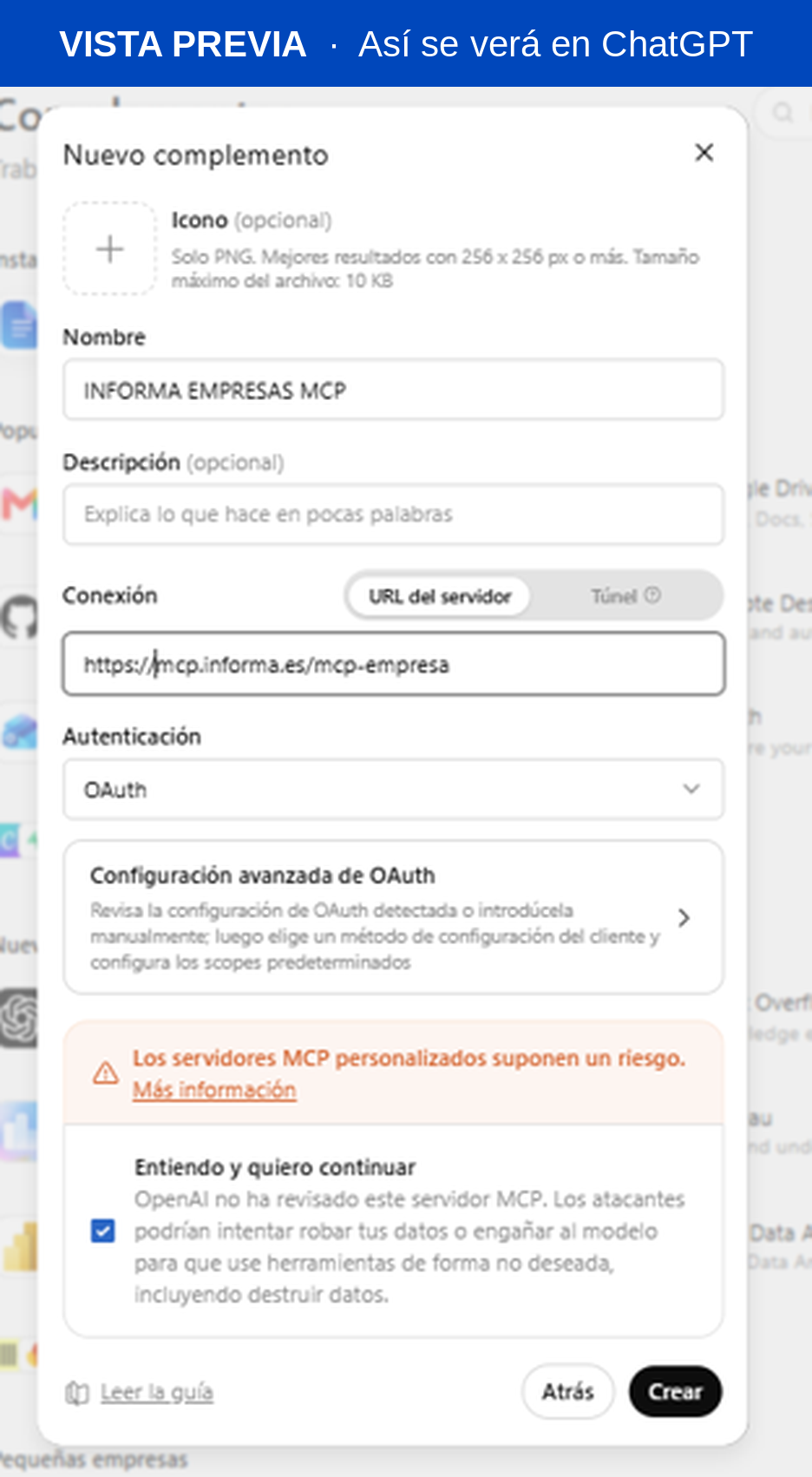
INFORMA's mcp-empresa connector is now available on ChatGPT.:
-
Disable model improvement
Select your name (bottom left), go to Settings > Data Controls and turn off Improve the model for everyone.
-
Create the MCP Empresas app
On Add-ons, click Explore catalogueOn the Add-ons screen, click Add and select Build Custom MCP Server.
-
Enter the name and URL
In the Build Custom MCP Server window, enter:
Name:
INFORMA-MCP. Connection URL: -
Authentication
On Authentication, select OAuth then click Advanced OAuth Settings
EIn the panel on the right, select user-defined OAuth Client and enter the client ID;leaving the Client Secret field blank.
OAuth Client IDmcp-empresa🔒 You only need this ID. Sign in with your INFORMA account
For Token-Based Authentication, select none
-
Sign in
Pulsa Click and sign in with your INFORMA account (OAuth).
How the connector works
Here is how it securely connects to INFORMA's data.
INFORMA Authentication

Access to the connector is authorised through your INFORMA account (OAuth) or an access token. Only authorised users can connect to the server.
Read-Only

The connector only retrieves information from the D&B catalogue. It does not create, modify, or delete data on either INFORMA's systems or your own.
No Credential Storage

The connector does not store your credentials. The access token is managed by your AI assistant during the authorised session.
Public Client

MCP-Empresas de INFORMA se identifica con un identificador público (mcp-empresa). INFORMA's MCP Empresas is identified by a public identifier (mcp-empresa). Authorisation is always performed using your INFORMA account or the token we have provided.
Frequently Asked Questions
Everything you need to know about MCP Empresas INFORMA
The MCP provides access to INFORMA's business information database. Your assistant formulates the queries and retrieves the information in natural language.Consulta aquí los datos disponibles→
No. Access is strictly read-only. The connector retrieves and returns information but cannot create, modify, or delete data in INFORMA's systems..
Yes. INFORMA's MCP-Empresas is a standard MCP connector and works with AI assistants that support MCP protocols, including Claude and ChatGPT. In both cases, simply paste the following URL.https://mcp.informa.es/mcp-empresas and enter the Client ID mcp-empresas, then sign in with your INFORMA account. Please note that each AI platform may have its own terms and conditions for using connectors.
Yes. To comply with INFORMA's AI Terms of Use, you must use a paid plan for your AI assistant.
You must also ensure that the model training options are disabled:
- In Claude, turn off "Help improve our AI models".
- In ChatGPT, turn off "Improve the model for everyone".
No additional credentials are required. Simply follow the instructions for your AI assistant and sign in with your INFORMA account. If you wish to connect using an access token contact us here.→
OAuth (username and password) — The recommended option for connecting through AI assistants such as Claude and ChatGPT. Use the same credentials you use to access your INFORMA account (the same ones you use to sign in to informa.es). The assistant manages the authentication process securely during the session.
Access token — Designed for programmatic integrations or environments where the OAuth flow is not available. Available for AI assistants such as Claude and ChatGPT. If you need to connect your AI assistant using an access token contact us here.→
Check that the server URL entered is exactly https://mcp.informa.es/mcp-empresas and that the Client ID mcp-empresas has been entered correctly in the advanced settings. Make sure your plan supports custom connectors. If the issue persists, sign out of your INFORMA account and authenticate again through the connector settings.
This connector provides access to information on 6.3 million Spanish companies. For companies from other countries, we will soon D&B's International MCP, which provides access to information on more than 650 million companies worldwide.